
Download Zoho Survey – Online Survey Software, Survey Tool, Feedback Tool
Overview
Zoho Survey is a web-based survey and questionnaire creation platform designed to accommodate users of all scales, from individual contributors to large multinational organizations. Built with scalability in mind, it enables efficient data collection through customizable forms, real-time analytics, and seamless integration with other productivity tools. The software is ideal for professionals in marketing, human resources, customer experience, education, and nonprofit sectors who need to gather structured feedback from diverse audiences.
Users can create surveys quickly using over 200 expertly designed templates across various domains, including customer satisfaction, employee feedback, event planning, and market research. The platform supports multiple question types, translation into over 30 languages, and mobile-optimized forms, ensuring broad accessibility. Surveys can be embedded on websites, shared via email, or published to social media, making data collection flexible and widely accessible.
Despite being cloud-based, Zoho Survey maintains a consistent workflow across Windows, Mac, Linux, and web environments. The developer did not provide additional system requirements. The software is accessible through any modern browser, eliminating the need for local installation on most devices. Real-world use cases include post-event feedback collection, employee engagement tracking, and product improvement initiatives based on customer insights.
Key Features & Capabilities
- 25+ Question Types – Supports multiple-choice, rating scales, matrix grids, text inputs, and more to capture detailed responses across different use cases.
- 200+ Pre-Built Templates – Offers ready-to-use designs for NPS surveys, HR feedback, event evaluations, and nonprofit outreach, accelerating survey deployment.
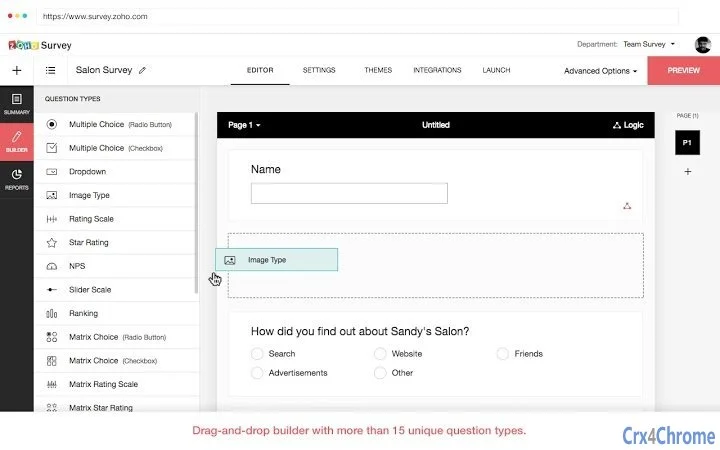
- Drag-and-Drop Builder – Enables intuitive form creation without technical expertise, allowing users to arrange questions and sections with ease.
- Real-Time Reporting – Provides live updates on response data, with customizable reports, filters, and export options in CSV, PDF, SPSS, and spreadsheet formats.
- Multi-Platform Distribution – Surveys can be shared via email, embedded on websites, published to Facebook, or hosted on custom domains for brand consistency.
- Offline Response Collection – Allows data capture without internet access, with automatic syncing when connectivity resumes.
- Advanced Logic & Piping – Enables conditional branching, dynamic question routing, and personalized content based on prior answers.
- Integration Ecosystem – Connects with Zoho CRM, Zoho Sheet, Zoho Campaigns, MailChimp, and Google Sheets for automated data flow and deeper insights.
- Survey Panels & Demographic Filtering – Offers access to targeted respondent pools and the ability to disqualify non-eligible participants based on user-defined criteria.
- Custom Branding & Themes – Users can apply custom themes, logos, colors, and domain hosting to align surveys with their organization’s identity.
User Interface, Workflow & Performance
The user interface of Zoho Survey is structured around a clean, browser-based dashboard that organizes survey creation, management, and reporting into distinct, intuitive sections. Navigation is straightforward, with a left-side menu providing access to surveys, responses, reports, and integrations. The drag-and-drop editor streamlines the process of building questionnaires, allowing users to add, reorder, and modify content with minimal friction.
Workflow efficiency is enhanced by the platform’s modular design, where each stage—from drafting to distribution and analysis—can be managed in a single environment. The real-time reporting feature allows immediate access to data, reducing delays in decision-making. While the developer did not specify resource usage details, the cloud-based architecture suggests minimal impact on local system performance.
Stability is maintained through Zoho’s infrastructure, which ensures consistent uptime and data integrity. The software operates across Windows, Mac, Linux, and web platforms without requiring local installation, making it accessible from any device with a modern browser. Performance observations are based on general software behavior patterns. No user-reported issues or crashes were included in the provided data.
Compatibility & System Requirements
Zoho Survey is compatible with Windows, Mac, Linux, and web platforms. The software is accessible through any modern web browser, including Chrome, Firefox, Safari, and Edge, without requiring a dedicated desktop application. The installation size of 100 MB refers to the optional desktop app, which may be used for enhanced access on certain systems.
Exact system requirements were not listed. The developer did not specify CPU, RAM, or storage thresholds. Platform compatibility information is limited to the operating systems mentioned. Users are advised to ensure their browser is up to date for optimal functionality. No additional hardware or software dependencies were noted.
Pros and Cons
Pros
- Free tier available with unlimited surveys and up to 15 questions and 150 responses per survey
- Extensive library of over 200 professionally designed templates
- Real-time reporting with customizable filters and export options
- Seamless integration with Zoho, Google, and MailChimp ecosystems
- Mobile-optimized forms and offline response collection
- Supports multilingual surveys and translation into over 30 languages
- Custom branding, domain hosting, and theme personalization
- Advanced logic features for targeted, dynamic surveys
Cons
- Free version limits survey size and response volume
- No downloadable desktop app for all platforms
- Advanced features require paid subscription
- Dependency on internet connectivity for full functionality
- Integration setup may require technical familiarity
- Cloud-based nature means data is stored externally
FAQ Section
Is Zoho Survey available as a desktop application?
Zoho Survey is primarily a web-based platform accessible through browsers on Windows, Mac, Linux, and mobile devices. While a desktop app with a 100 MB size is available, its functionality is limited to enhanced access and does not replace the full web experience.
Can I use Zoho Survey offline?
Yes, users can collect responses offline through the desktop app or mobile browser. Data is stored locally and automatically synced once internet connectivity is restored.
Is Zoho Survey secure?
As a cloud-based platform, Zoho Survey leverages Zoho’s infrastructure for data protection. However, exact security protocols were not detailed in the provided information. Users should review Zoho’s privacy policies for further details.
What is the pricing model?
Zoho Survey offers a free plan with limitations on questions and responses. Paid editions start at $19/month, providing unlimited surveys, questions, responses, and advanced features like custom domains and survey panels.
Can I integrate Zoho Survey with my existing tools?
Yes, Zoho Survey integrates with Zoho CRM, Zoho Sheet, Google Sheets, MailChimp, and Zoho Campaigns. These integrations allow real-time data transfer and automated workflows.
Final Thoughts
Zoho Survey stands out as a powerful, scalable solution for creating and managing online surveys across diverse industries. Its combination of intuitive design, rich template library, and robust integration capabilities makes it a top choice for teams seeking efficient feedback collection. The free plan offers strong value for small-scale projects, while the paid tiers unlock enterprise-grade features.
Professionals in HR, marketing, education, and customer service will benefit most from its dynamic logic, real-time analytics, and branding tools. Despite minor limitations in the free version, the platform’s flexibility, cross-platform access, and continuous updates make it a reliable choice.
Download Zoho Survey now







